

Forms that ask everyone the same questions waste time. A contractor doesn't need a benefits enrollment field. A full-time employee doesn't need a contract end date. The right form shows the right fields to the right person — and hides everything else.
This is conditional logic: fields that appear, disappear, and become required based on what the user has already entered. It's the difference between a static list of inputs and a form that adapts.
What conditional logic actually means in forms
Conditional logic controls three things:
- Visibility — a field is shown or hidden based on another field's value
- Conditional requirements — a field becomes required only when it's relevant
- Cascading dependencies — one condition triggers another, creating layered branching
Most form builders handle the first one. Few handle all three. And when they do, the configuration usually involves clicking through nested if-then-else rule panels, one field at a time.
How Formidable handles conditional logic
In Formidable, you describe conditional rules in plain language. The AI generates a form specification with visibility and requirement expressions written in FEEL — a standard expression language that evaluates in real time as the user fills out the form.
No rule builder UI. No if-then-else panels. One sentence can produce complex branching across multiple fields.
Here's what that looks like: you describe an employee onboarding form where the visible fields change depending on employment type.
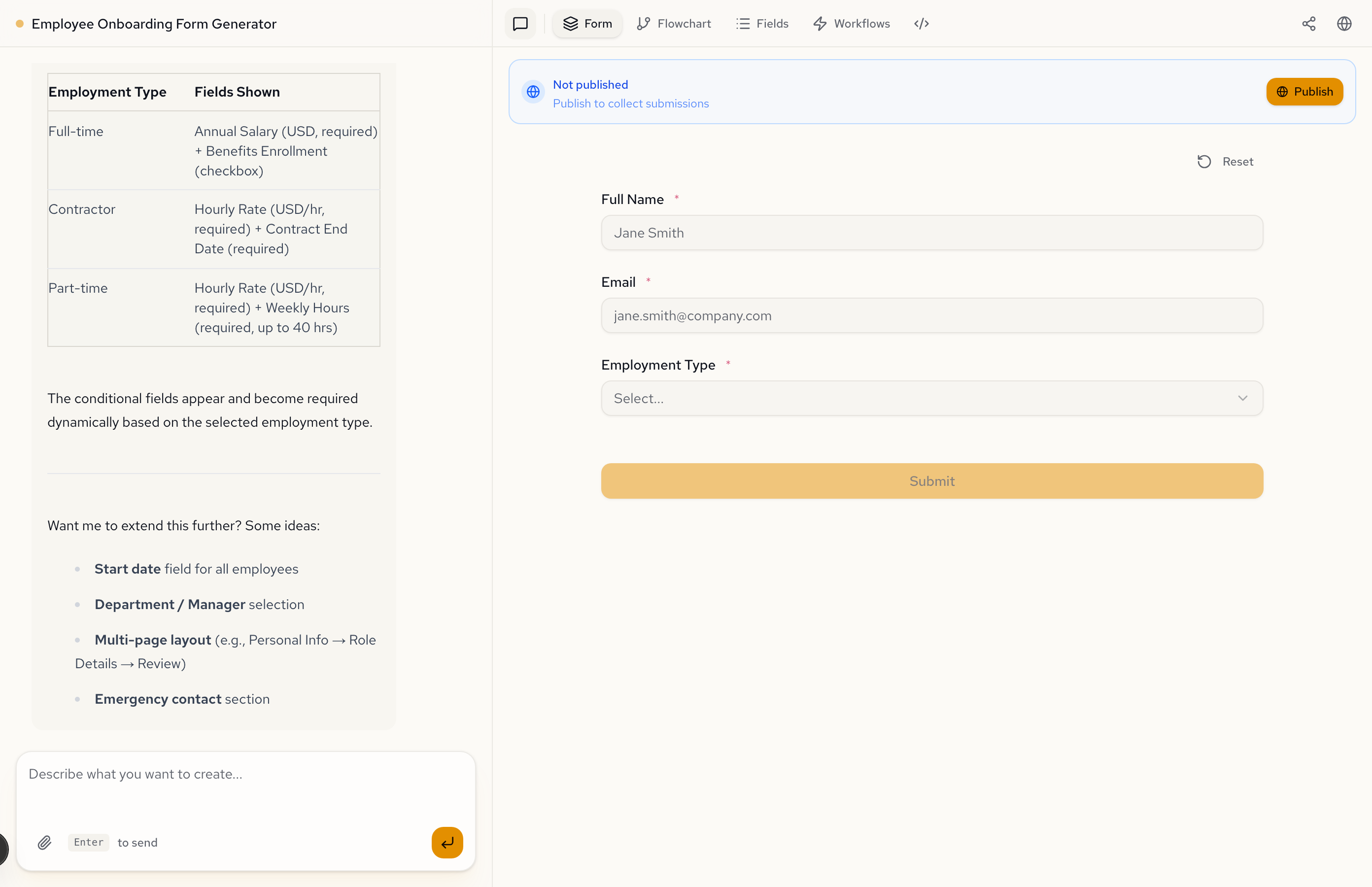
The AI generates a complete form specification with visibleWhen and requiredWhen expressions on every conditional field.
See it in action
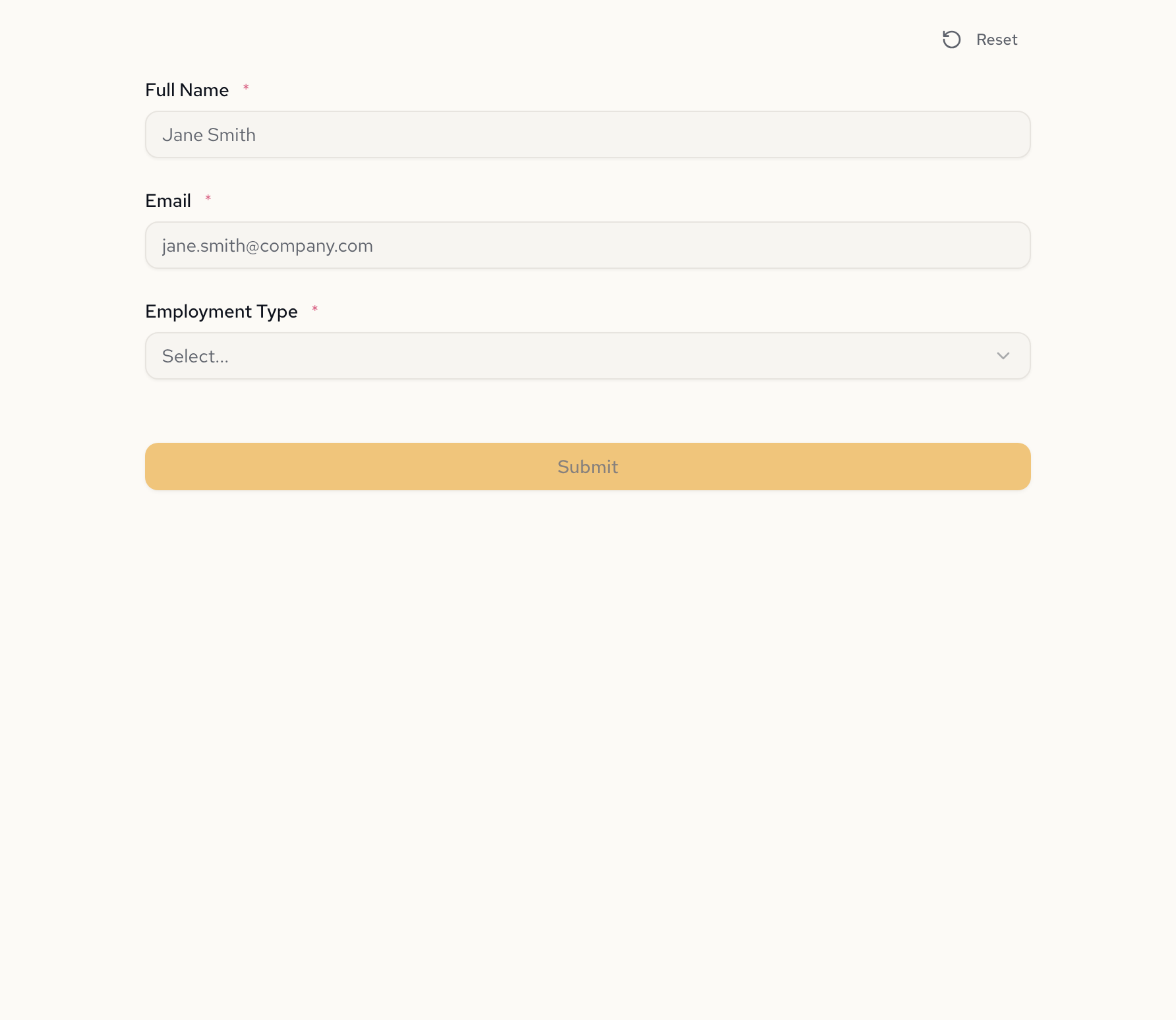
The generated form starts with three fields: name, email, and employment type. Nothing else is visible yet.
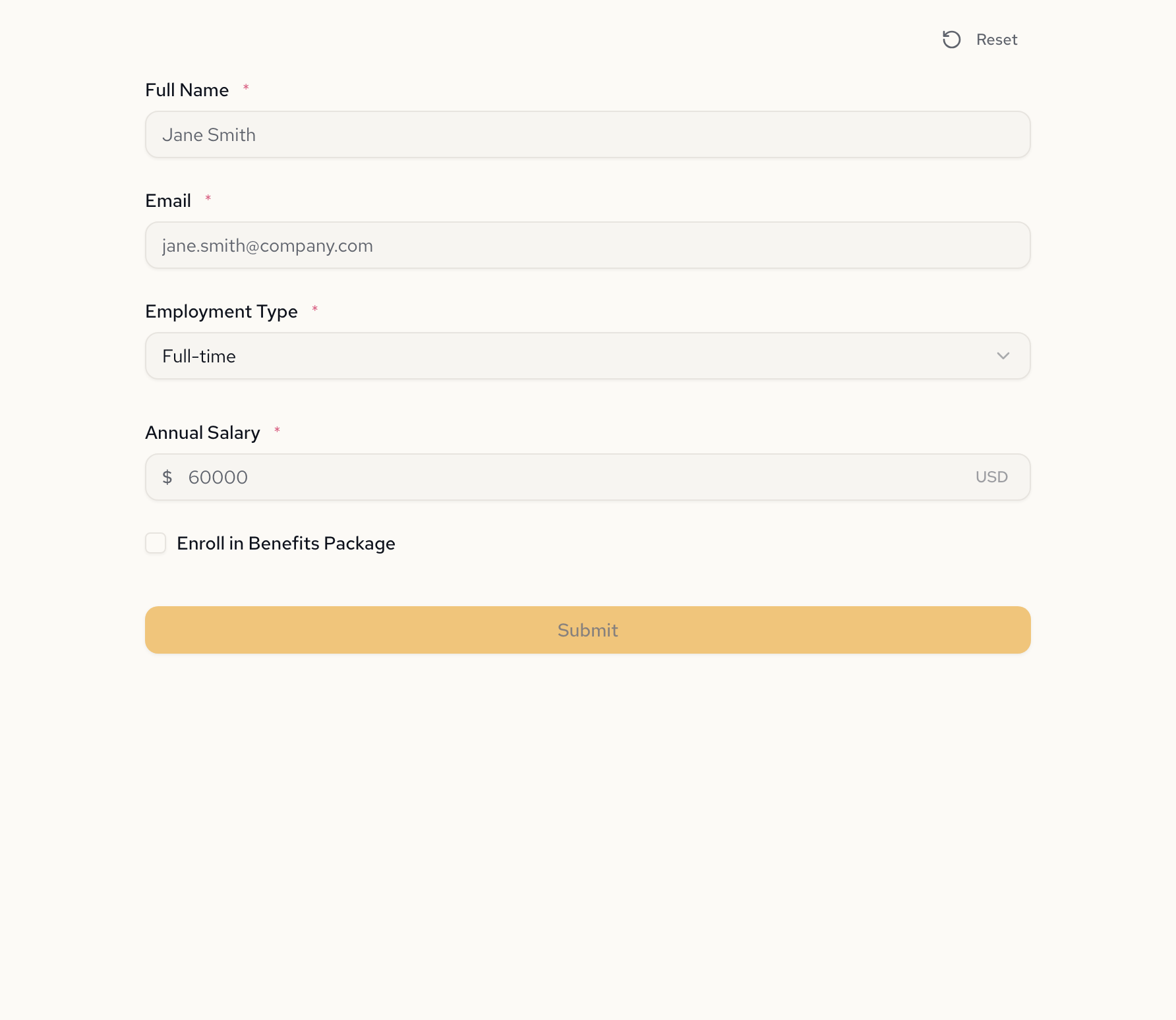
Select Full-time, and the form reveals annual salary and benefits enrollment:
Switch to Contractor, and those fields disappear. Hourly rate and contract end date take their place:
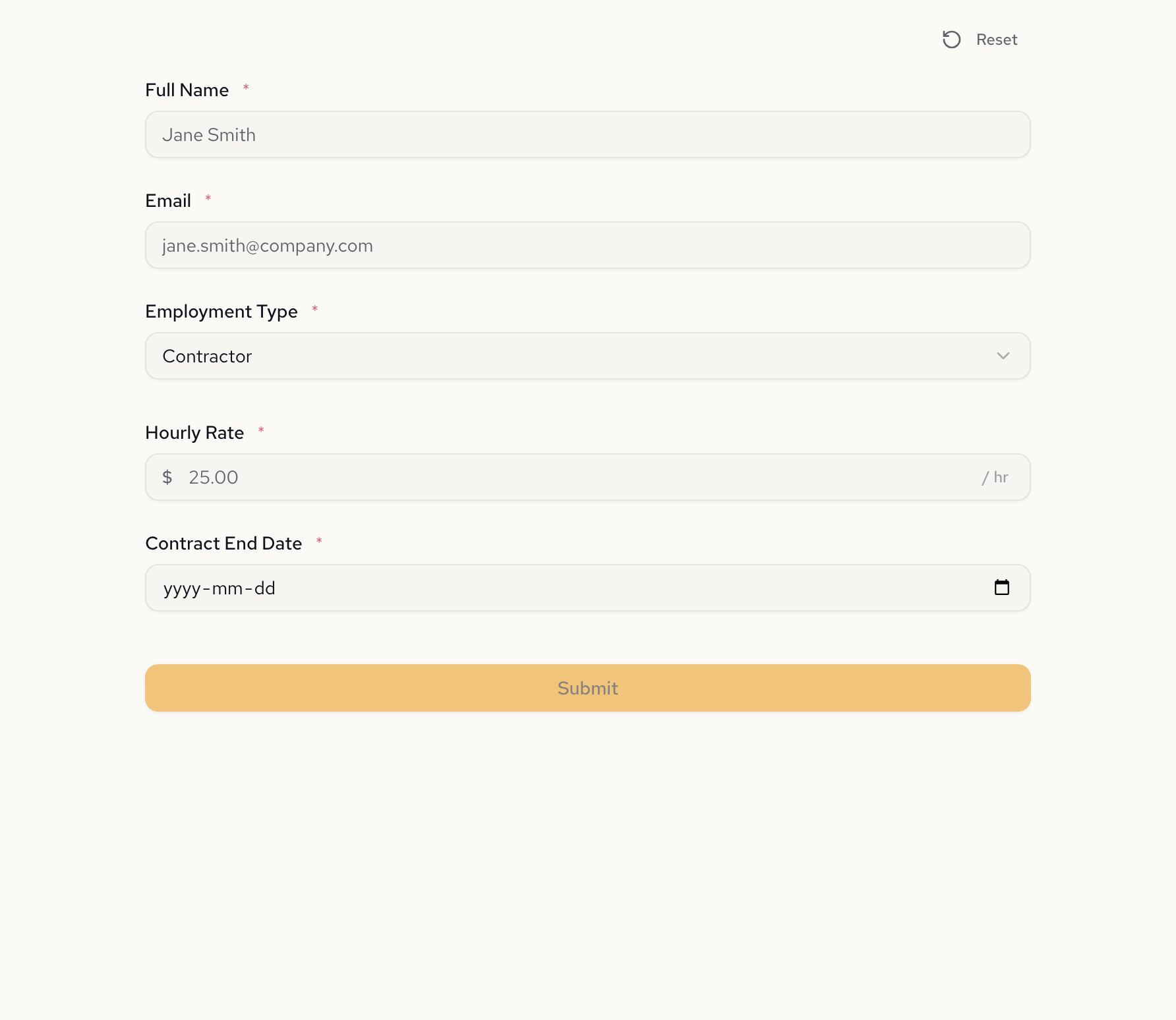
The fields don't just show and hide — they become required when visible. A contractor can't skip the contract end date. A full-time employee can't skip the salary field. The form enforces the rules it generates.
What the specification looks like
Under the hood, each conditional field has a visibleWhen expression. Here's what the AI generated for this form:
{
  "annualSalary": {
    "type": "number",
    "label": "Annual Salary",
    "prefix": "$",
    "suffix": "USD",
    "visibleWhen": "employmentType = \"full_time\"",
    "requiredWhen": "employmentType = \"full_time\""
  },
  "hourlyRate": {
    "type": "number",
    "label": "Hourly Rate",
    "prefix": "$",
    "suffix": "/ hr",
    "visibleWhen": "employmentType = \"contractor\" or employmentType = \"part_time\"",
    "requiredWhen": "employmentType = \"contractor\" or employmentType = \"part_time\""
  },
  "contractEndDate": {
    "type": "date",
    "label": "Contract End Date",
    "visibleWhen": "employmentType = \"contractor\"",
    "requiredWhen": "employmentType = \"contractor\""
  }
}
Each expression is evaluated as the user types. No page reloads. No server round-trips. The form engine reads the spec and handles the rest.
The logic, visualized
The Flowchart tab generates a decision tree from the same specification. Every branch, every condition, every field — rendered automatically.
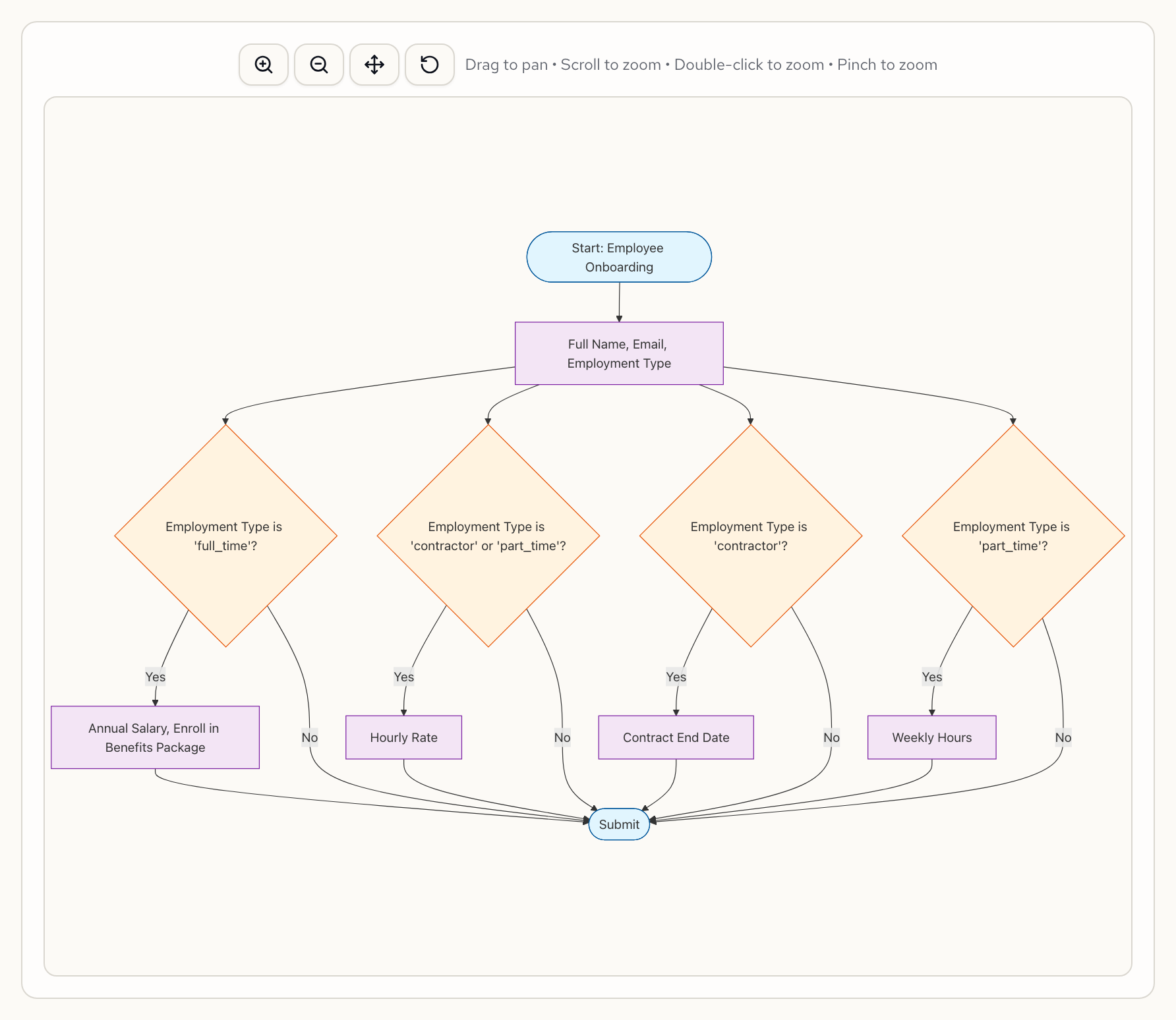
Change a visibility rule and the flowchart updates to match. This is the same data that powers the form — just rendered differently.
See conditional logic in real forms
Conditional visibility is a building block. Here's how it appears in more complex scenarios:
- Patient Intake Validation — age-based screening where minors see guardian fields and seniors see fall risk assessment. Three age brackets, each with different required fields.
- Compliance Checklist — conditional failure escalation where triggered violations surface corrective action fields and escalation contacts.
- AI Loan Application — employment-type-conditional fields plus computed debt-to-income ratios and approval logic chained to field visibility.
Coming soon: use it headless
We're building a validation API so you can evaluate conditional logic server-side — the same rules that power the form preview, available as a REST endpoint. Here's what we're working toward:
curl -X POST https://api.formidable.software/f/employee-onboarding/validate \
  -H "Authorization: Bearer sk_live_..." \
  -d '{
    "fullName": "Alex Chen",
    "email": "alex@example.com",
    "employmentType": "contractor",
    "hourlyRate": 75,
    "contractEndDate": "2027-01-15"
  }'
{
  "valid": true,
  "fields": {
    "fullName": { "valid": true },
    "email": { "valid": true },
    "employmentType": { "valid": true },
    "hourlyRate": { "valid": true, "visible": true },
    "contractEndDate": { "valid": true, "visible": true },
    "annualSalary": { "visible": false },
    "benefitsEnrollment": { "visible": false },
    "weeklyHours": { "visible": false }
  }
}
The idea: publish a form, hit an endpoint, and get back which fields were visible for the submitted data and whether each passed validation. Hidden fields excluded from validation automatically. No rebuilding conditional logic in your backend — the spec is the source of truth everywhere.
This is actively in development. If headless form validation is something you'd use, we'd love to hear about your use case — reach out at hello@formidable.software.
Traditional form builder vs. Formidable
In a traditional form builder, the employee onboarding form above would require:
- Creating all 8 fields in a drag-and-drop editor
- Opening a rule panel for each conditional field (5 fields × 1-2 rules each)
- Clicking through if-then dropdowns: "If Employment Type equals Full-time, show Annual Salary"
- Repeating for visibility and requirement rules separately
- Testing each combination manually (3 employment types × their visible fields)
- No API — rebuilding the logic in your backend for server-side validation
That's 10+ rules configured across 5+ screens, plus manual testing for 3 paths.
With Formidable, you write one sentence:
"If Full-time: show annual salary and benefits enrollment. If Contractor: show hourly rate and contract end date. If Part-time: show hourly rate and weekly hours."
The AI generates the specification, the form renders it, the flowchart visualizes it, and the API validates it. Same logic, everywhere, from one description.
FAQ
Can I show fields based on multiple conditions?
Yes. Visibility expressions support and, or, and nested conditions. For example, employmentType = "contractor" or employmentType = "part_time" shows a field for both contractors and part-time employees. You can combine as many conditions as needed in a single expression.
How does conditional logic work with required fields?
Every conditional field can have both a visibleWhen and a requiredWhen expression. A field can be visible but optional, or visible and required — the two rules are independent. When a field is hidden, it's automatically excluded from validation regardless of its requirement rule.
Does conditional logic work in multi-page forms?
Yes. Visibility expressions can reference fields from any page in the form. If a selection on page 1 should control which fields appear on page 3, the expression references the page 1 field directly. The form engine evaluates all expressions across all pages.
Can I chain conditions — where one conditional field controls another?
Yes. A field's visibility can depend on another conditional field's value, or even on a computed value. In the patient intake example, a computed cardiovascular risk flag controls whether the specialist referral section appears. The chain can go as deep as needed.
Try building one
Paste this into Formidable and watch the conditional fields generate:
Create an employee onboarding form. Ask for name, email, and employment type (Full-time, Part-time, Contractor). If Full-time: show annual salary and benefits enrollment. If Contractor: show hourly rate and contract end date. If Part-time: show hourly rate and weekly hours.
Then switch employment types in the preview. That's conditional logic — described in one sentence, working in seconds.
Sign up free and build your first conditional form.
Learn more about conditional logic in Formidable.